

Google penalty recovery starts with knowing exactly what went wrong. A sudden fall in Google traffic is alarming, but not every drop is a penalty. It could be a manual action, an algorithm update, a technical mistake, a hack, seasonality or even broken tracking. This Google penalty analysis guide shows how to find out which one you are facing, how to know if your website is penalized by Google, and the recovery steps for each cause.
What is a Google penalty?
“Google penalty” is the everyday name for two different things. A manual action is applied by a human reviewer at Google who has found a violation of Google’s spam policies; it is reported in Search Console. An algorithmic drop happens when Google’s automated ranking systems — including core and spam updates — re-evaluate your website and rank it lower. There is no notification for algorithmic drops, which is why careful Google penalty analysis matters: the recovery path is completely different for each.
| Type | How you find out | How to recover |
|---|---|---|
| Manual action | A message in Search Console’s Manual actions report | Fix the problem, then submit a reconsideration request |
| Algorithm update | Traffic changes around a confirmed Google update | Improve content, links and experience; recovery follows later updates |
| Technical issue | Indexing, crawl or redirect errors in Search Console | Fix the error; recovery is often quick |
| Security issue (hack) | Search Console’s Security issues report or browser warnings | Clean the site, close the vulnerability, request a review |

How to know if your website is penalized by Google
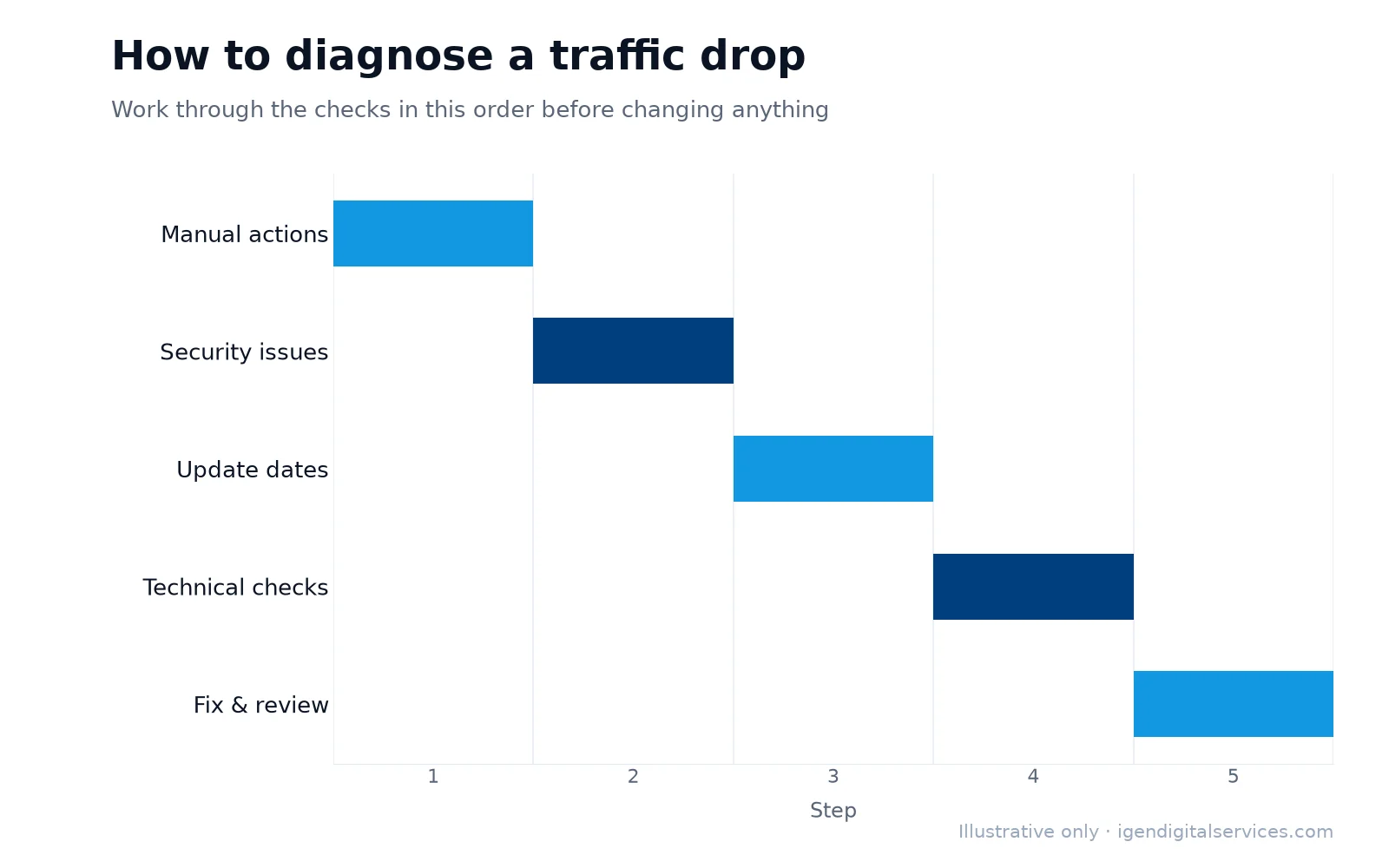
A careful Google penalty analysis works through these checks in order:
- Manual actions report — open Google Search Console and check “Manual actions”. If it lists an issue, you have a manual penalty.
- Security issues report — check whether Google has detected hacked content or malware.
- Date of the drop — compare it with the Google Search Status Dashboard, which lists confirmed ranking updates.
- Indexing — check the page indexing report and search site:yourdomain.com to see whether pages have disappeared.
- Brand search — search your business name; if you no longer rank first, something serious may be wrong.
- Which pages dropped — in the Search Console performance report, compare periods to see whether the fall affects the whole site or specific pages and queries.
- Tracking — confirm your analytics code is still installed; a missing tag can look like a traffic collapse.
Our free Google penalty checker at the top of this page walks you through the most important of these signals in two minutes.
How our Google penalty checker works
The Google penalty checker asks ten questions about signs that commonly accompany penalties and algorithm hits — a sudden drop of 30% or more, a manual action message, your brand no longer ranking first, pages disappearing from Google, bought or exchanged links, thin or auto-generated content, timing around a Google update, keyword stuffing, signs of hacking, and intrusive pop-ups or ads. Stronger signals, such as a manual action message, carry more weight. As you tick the items that apply, the risk meter updates to show whether a penalty is unlikely, possible or likely. It is a guided self-assessment; only a review of your Search Console data and website can confirm the cause.
Types of manual actions
Google lists several kinds of manual action, including:
- Unnatural links to your site — bought links, link schemes or excessive link exchanges.
- Unnatural links from your site — selling links or linking manipulatively to other sites.
- Thin content with little or no added value — copied, scraped, auto-generated or doorway pages.
- Pure spam — aggressive spam techniques across the site.
- User-generated spam — spam posted in comments, forums or profiles on your site.
- Cloaking and sneaky redirects — showing search engines different content from visitors.
- Hidden text and keyword stuffing — text or keywords hidden from visitors or repeated unnaturally.
- Structured data issues — markup that misrepresents the page content.
- Site reputation abuse — third-party pages published to exploit a site’s ranking signals.
The Manual actions report tells you which type applies and whether it affects the whole site or specific pages.
Google algorithm update traffic drops
Google makes changes to its ranking systems constantly and announces larger core and spam updates. When an update reduces your traffic, it usually means Google now considers other pages more helpful or trustworthy for those searches — not that you are being punished. Common reasons include content that is thin, outdated or written mainly for search engines; weak signs of experience and expertise; poor page experience; and links that no longer carry value after a spam update. Recovery comes from genuinely improving the website, and improvements are usually reflected over the following weeks or after later updates.

Technical problems that look like penalties
Many “penalties” we investigate during a Google penalty analysis turn out to be technical:
- A noindex tag left on after a redesign or staging setup.
- A robots.txt rule blocking important pages or the whole site.
- Redirects missing or broken after a website migration or URL change.
- Canonical tags pointing to the wrong pages.
- The server returning errors or timing out when Google crawls.
- Analytics tracking removed or duplicated, distorting traffic figures.
These are often fixed within hours, and traffic returns as Google recrawls the pages. Our free SEO analysis checks several of these automatically.
Other reasons traffic can fall
Not every drop is a problem with your website. Demand can be seasonal — admissions, festivals and holidays change search volumes. A competitor may have improved their pages. Search results may now show more ads, maps, videos or AI-generated answers above the organic results, reducing clicks even when rankings hold. Checking impressions and average position alongside clicks in Search Console helps separate these causes from genuine ranking losses.
A traffic drop checker: step by step
Use this simple traffic drop checker to narrow down the cause:
- Is there a manual action or security issue? If yes, follow the recovery process for that issue.
- Did the drop start on a single day? Sudden drops point to technical changes, manual actions or updates; gradual declines point to competition or content ageing.
- Does the date match a Google update? If yes, review content quality and links on the affected pages.
- Did anything change on the site? Redesigns, migrations, plugin updates and URL changes are common triggers.
- Are impressions down, or only clicks? Falling clicks with stable impressions suggest changes in the search results, not rankings.
- Is the whole site affected, or certain pages? Site-wide drops suggest technical or site-wide quality issues; page-level drops suggest content or competition.
When to use the Google penalty checker
Use the Google penalty checker whenever organic traffic or enquiries fall noticeably and you cannot see an obvious reason — after a Google update is announced, after a redesign or migration, after changing SEO providers, or when you discover links or content you did not create. It is also worth running before hiring an SEO agency, so you understand the risks already present on your website. Because the Google penalty checker takes only two minutes, it is a sensible first step before spending money on a full investigation.
Google penalty analysis for ecommerce and large websites
Large websites and online stores face extra risks: thousands of near-identical product or filter pages, thin category pages, duplicate descriptions copied from manufacturers, and user reviews that may attract spam. A Google penalty analysis for these sites looks at patterns across templates rather than individual pages — for example, whether a whole section lost visibility after an update, or whether filter pages are being indexed in large numbers. Fixing the template often fixes thousands of pages at once.
Recovering from a manual action
- Read the report carefully to understand the exact issue and affected pages.
- Fix every instance, not just examples — remove or improve thin content, remove or nofollow manipulative links, clean spam.
- For link issues, ask site owners to remove bad links and use Google’s disavow tool for those you cannot remove.
- Document the work — what you found, what you fixed and how you will prevent it recurring.
- Submit a reconsideration request in Search Console with a clear, honest explanation.
Google reviews the request and either lifts the action or explains what remains. Reviews can take from days to several weeks.
Recovering from a hack
Hacked websites can be flagged in search results and browsers, which destroys trust quickly. Restore a clean backup or remove the malicious code, update all software, change every password, close the vulnerability that allowed the attack, remove spam pages and then request a review through the Security issues report. After cleaning, monitor the site closely for reinfection.
Should you use the disavow tool?
Google says it ignores most random spammy links automatically, so most websites never need to disavow anything. Disavowing makes sense when you have a manual action for unnatural links, or when you know links were bought or built through schemes in the past and cannot be removed. Used carelessly, disavowing good links can harm rankings, so it should be done after a careful link review.
Working with an SEO agency safely
Many penalties are caused by past SEO work the business owner never saw — bought links, spun articles or hidden pages. When hiring any SEO provider, ask exactly how they build links and create content, request a list of every link built, keep ownership of your Search Console and analytics accounts, and be wary of guaranteed rankings or unusually cheap packages. A reputable agency will explain its methods openly. If you inherit a website with a questionable history, a review of its backlinks and content before investing further can save months of wasted effort.
How to prevent Google penalties
- Follow Google’s spam policies and avoid shortcuts such as bought links or auto-generated pages.
- Write content for people, based on real expertise, and keep it updated.
- Keep WordPress, themes and plugins updated, use strong passwords and take regular backups.
- Moderate comments and user-generated content.
- Check Search Console at least monthly for manual actions, security issues and indexing problems.
- Test indexing, redirects and speed before and after every redesign or migration.
Our Google penalty analysis service
When the self-check suggests a problem, our team can investigate properly. A professional Google penalty analysis reviews your traffic history against Google’s update timeline, checks Search Console for manual actions and security issues, audits backlinks and content quality, and identifies technical errors. You receive a clear explanation of the likely cause and a prioritised recovery plan, and we can help with reconsideration requests and ongoing SEO services. Request a review and we will reply within one working day with next steps and pricing.
If you would like expert help, explore our free Google penalty checker or request a quote for your business.
Key takeaways
- Google penalties are either manual actions (shown in Search Console) or algorithmic drops (no message).
- Start any Google penalty analysis with the Manual actions and Security issues reports, then compare dates with Google updates.
- Many apparent penalties are technical problems such as noindex tags, robots.txt blocks or broken redirects.
- Recovery depends on the cause: fixes and reconsideration for manual actions, real improvements for algorithm updates.
Google penalty recovery: frequently asked questions
How do I know if my website is penalized by Google?
Is this Google penalty checker a real penalty test?
What is a Google manual action?
Can a Google algorithm update cause a traffic drop?
How long does penalty recovery take?
Is the Google penalty checker free?
What is a traffic drop checker?
Can you help with a reconsideration request?
Want expert help with this?
See what our free Google penalty checker include, or get a free proposal for your business.

Digital Marketing Consultant and Certified Marketing Analyst from IIT Roorkee, with 10+ years of experience helping businesses improve their digital presence, generate qualified leads and drive measurable growth through SEO, AEO, GEO, Google Ads, performance marketing and analytics.