

This SEO audit checklist walks through every check in our free tool and how to fix what it finds. Running a free SEO analysis is the easy part. The real value comes from understanding each result and fixing what matters. This guide walks through every check in our website SEO checker — what it looks at, why it matters and how to fix it — then explains the difference between a free SEO audit and a detailed SEO audit, and what a full audit should cost.
How to check your website SEO score
- Enter your website address in the tool at the top of this page.
- Wait a few seconds while the website SEO checker reads the page as a search engine would.
- Review your score out of 100 and the results in each group.
- Fix the red items first, then the amber ones.
- Run the free SEO analysis again to confirm your changes worked.
Test your homepage first, then your most important service or product pages. Each page is analysed separately, because each page can rank on its own.

On-page SEO checks
Title tag
The title tag is the clickable headline in Google results and the text shown in browser tabs. Each page needs a unique title that puts the main topic near the start and stays short enough to display fully — roughly 50 to 60 characters. Google explains how it chooses titles in its guide to title links. Fix missing, duplicate or overly long titles first; they are among the most important on-page signals.
Meta description
The meta description is the short summary that often appears under your title in search results. It does not directly affect rankings, but a clear, specific description with a benefit or call to action encourages more people to click. Aim for one or two sentences, roughly 140 to 160 characters, unique to each page.
Main heading (H1)
Each page should have one main heading that tells visitors and search engines what the page is about. It usually matches the topic of the title, written for people rather than keywords. Missing H1s, or several competing H1s, make the page’s topic less clear.
Subheadings (H2)
Subheadings break content into sections that are easy to scan and help search engines understand the topics a page covers. Well-written subheadings often match the questions people search for, which also helps pages appear in featured snippets and AI answers.
Image alt text
Alt text describes an image for screen readers and search engines. Describe what the image shows in a few words, including the topic naturally where it fits. Decorative images can have empty alt text, but meaningful images — products, team photos, diagrams — should always be described.
Content checks
Amount of content
Pages with very little text give search engines and visitors little to understand. There is no perfect length, but important service and product pages should explain what you offer, who it is for, how it works, pricing guidance and common questions. Thin pages with only a heading and a few lines rarely rank for competitive searches.
Internal links
Internal links connect your pages, helping visitors find related information and helping search engines discover pages and understand which are most important. Link from relevant text using descriptive words, for example “our local SEO services” rather than “click here”.
Technical SEO checks
Secure connection (HTTPS)
HTTPS encrypts the connection between your website and visitors. Browsers warn users about sites without it, and Google uses it as a signal. Most hosts provide free SSL certificates; make sure every page redirects to the HTTPS version.
Server response time
This measures how quickly your server starts sending the page. Slow responses delay everything else. Common fixes include caching, better hosting, fewer heavy plugins and a content delivery network. Our page speed analysis tool looks at speed in more detail.
Page size
Very large pages take longer to load, especially on mobile data. Large images, videos, unused scripts and bulky page builders are the usual causes. Compress images, remove unused code and load heavy elements only when needed.
Search engine indexing
This check confirms the page is not blocked from appearing in search results by a noindex tag. A noindex left on after a redesign or staging setup is one of the most common causes of sudden traffic loss, and one of the easiest to fix.
Canonical tag
The canonical tag tells search engines which address is the main version of a page. It prevents duplicate versions — for example with tracking parameters or with and without “www” — from competing with each other. Each page should usually have a canonical tag pointing to itself.
Language declared
Declaring the page language helps browsers, screen readers and search engines handle your content correctly. It is a one-line setting in the page code, usually controlled by your website platform.
Mobile-friendly viewport
The viewport setting tells phones how to size the page. Without it, pages appear tiny and zoomed out on mobile. Most people search on phones, and Google primarily uses the mobile version of your site for ranking.
robots.txt
The robots.txt file tells crawlers which parts of your site they may visit. A mistake here can block your whole website from search engines, so check it carefully after any change. It should also list your sitemap address.
XML sitemap
An XML sitemap lists the pages you want search engines to find. Submit it in Google Search Console and keep it updated automatically through your website platform or SEO plugin.

Social and rich results checks
Structured data (schema)
Structured data describes your business, services, products, articles and FAQs in a format search engines and AI tools understand directly. It can make pages eligible for rich results and helps your business be described accurately. Local businesses should at least mark up their name, address, phone number and opening hours.
Social sharing tags
Open Graph tags control the title, description and image shown when your pages are shared on WhatsApp, Facebook, LinkedIn and other platforms. Without them, shared links can look broken or unprofessional.
Favicon
The favicon is the small icon shown in browser tabs and sometimes beside your site in mobile search results. It is a small detail that makes your brand look established and trustworthy.
Checks that go beyond one page
Some important SEO questions can only be answered by looking at the whole website: whether several pages compete for the same keyword, whether any pages return errors, whether redirects chain through several steps, and whether valuable pages are buried too deep in the menu for visitors and crawlers to find. Google Search Console’s page indexing report is the best free starting point for these site-wide checks, and they form a core part of our detailed audit.
Free SEO audit or detailed SEO audit?
| Option | What you get | Price |
|---|---|---|
| Instant free SEO analysis | Automatic checks on one page in seconds | Free |
| Free basic on-page SEO audit | Our team reviews your website’s on-page SEO and sends key fixes within 48 hours | Free |
| Detailed SEO audit report | On-page, off-page and technical audit of the whole website with a prioritised list of fixes | ₹1,999 including taxes for websites under 200 pages |
The instant tool is ideal for quick checks. The free SEO audit adds a human review of your main pages. The detailed SEO audit looks at the whole website, backlinks and competitors, and gives you a prioritised plan.
What a full SEO audit covers
A complete SEO audit goes well beyond a single-page check:
- Technical SEO — crawling and indexing across every page, redirects, broken links, duplicate content, speed, mobile usability and structured data.
- On-page SEO — titles, descriptions, headings and content on every page, keyword targeting and cannibalisation between pages.
- Content — quality, depth, gaps compared with competitors and opportunities for new pages.
- Off-page SEO — backlink profile, toxic or spammy links, brand mentions and local citations.
- Local SEO — Google Business Profile and consistency of business details, where relevant.
- Priorities — a clear list of fixes ranked by impact and effort.
SEO audit report cost in India
The cost of an SEO audit depends on the size and complexity of the website and the depth of analysis. Our detailed SEO audit report is a flat ₹1,999 including taxes for websites under 200 pages; larger websites are quoted separately. The report is yours to keep, whether you fix the issues yourself, ask your developer or work with our SEO services team.
Problems we often find on small business websites
Across the websites we review, the same issues appear again and again:
- The same title on every page, often just the business name.
- Service pages with a few lines of text and no answers to common questions.
- Contact details shown only as an image, which search engines and AI tools cannot read.
- Large, uncompressed photos slowing down the homepage.
- Old pages from a previous website returning errors instead of redirecting.
- No structured data, so Google has to guess the business name, address and services.
None of these need a large budget to fix, and together they often explain why a good business is hard to find online.
How long do SEO fixes take to show results?
Technical fixes such as removing a noindex tag or fixing robots.txt can show results as soon as Google recrawls the page, often within days or a few weeks. Improvements to titles and descriptions can lift click-through rates within weeks. Content and link improvements take longer — usually a few months — because search engines need time to re-evaluate the page against competitors. Watch Google Search Console rather than checking rankings daily; trends over several weeks tell the real story.
What to do after your free SEO analysis
- Fix quick wins yourself — titles, descriptions, headings and alt text can usually be edited in your website dashboard.
- Share technical issues with your developer — speed, indexing, canonical and sitemap problems may need technical help.
- Request the free audit — our team reviews your on-page SEO and sends the key fixes.
- Track progress — re-run the check after changes and watch Search Console for improvements over the following weeks.
If you would like expert help, explore our free SEO analysis tool or request a quote for your business.
Key takeaways
- A free SEO analysis checks up to 19 on-page, content, technical and social basics on one page.
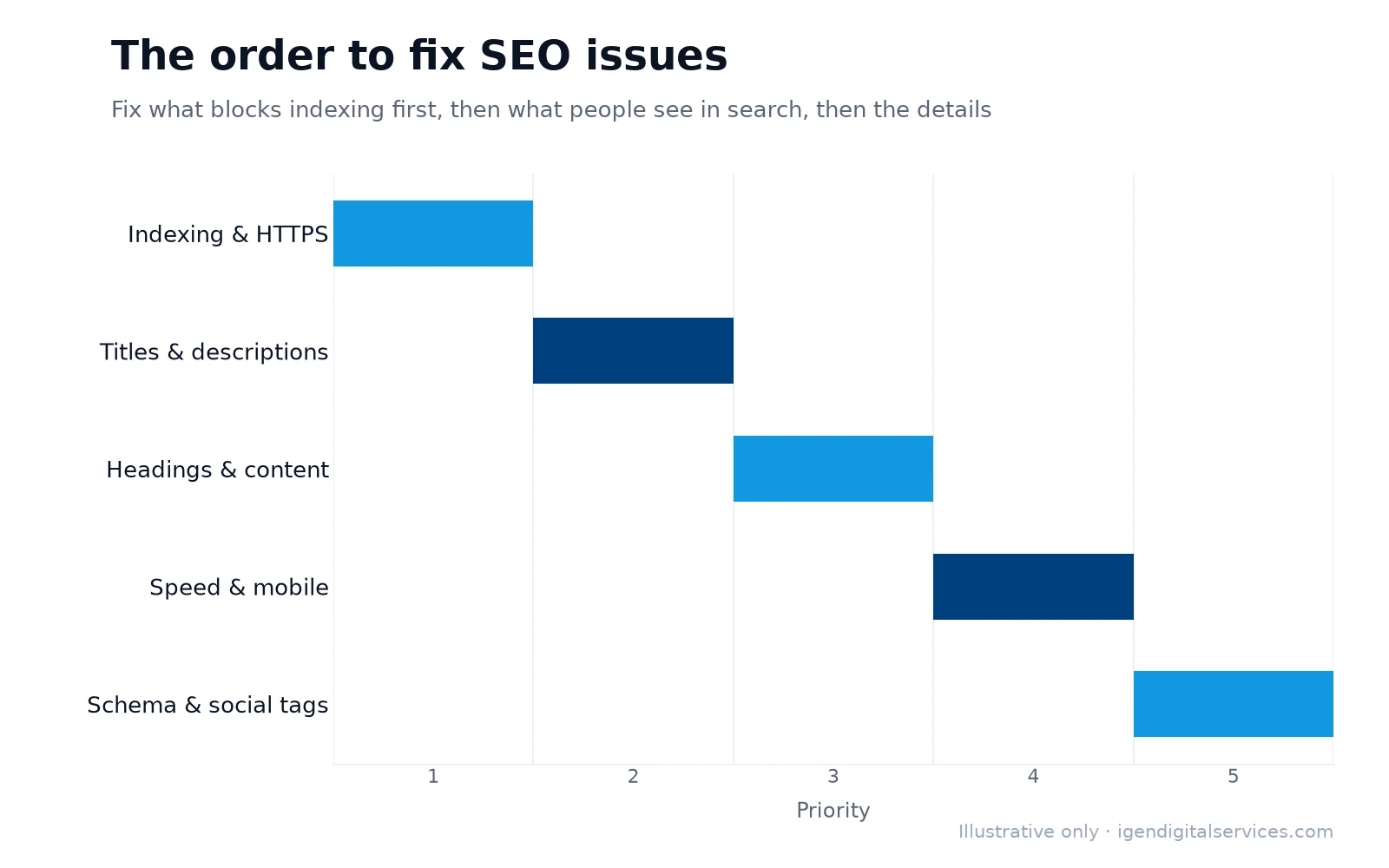
- Fix anything that blocks indexing first, then titles, descriptions and headings.
- The free SEO audit adds a human review; the ₹1,999 detailed audit covers the whole website.
- Re-run the website SEO checker after changes to confirm your fixes worked.
SEO audit checklist: frequently asked questions
Is this free SEO analysis tool accurate?
How is the free SEO audit different from the instant tool?
What does the ₹1,999 SEO audit include?
Why is my score different on other SEO checkers?
Can I analyse a competitor’s website?
Will a higher SEO score improve my rankings?
Want expert help with this?
See what our free SEO analysis tool include, or get a free proposal for your business.

Digital Marketing Consultant and Certified Marketing Analyst from IIT Roorkee, with 10+ years of experience helping businesses improve their digital presence, generate qualified leads and drive measurable growth through SEO, AEO, GEO, Google Ads, performance marketing and analytics.